I Built a CLI Tool for Viewing Git Graphs

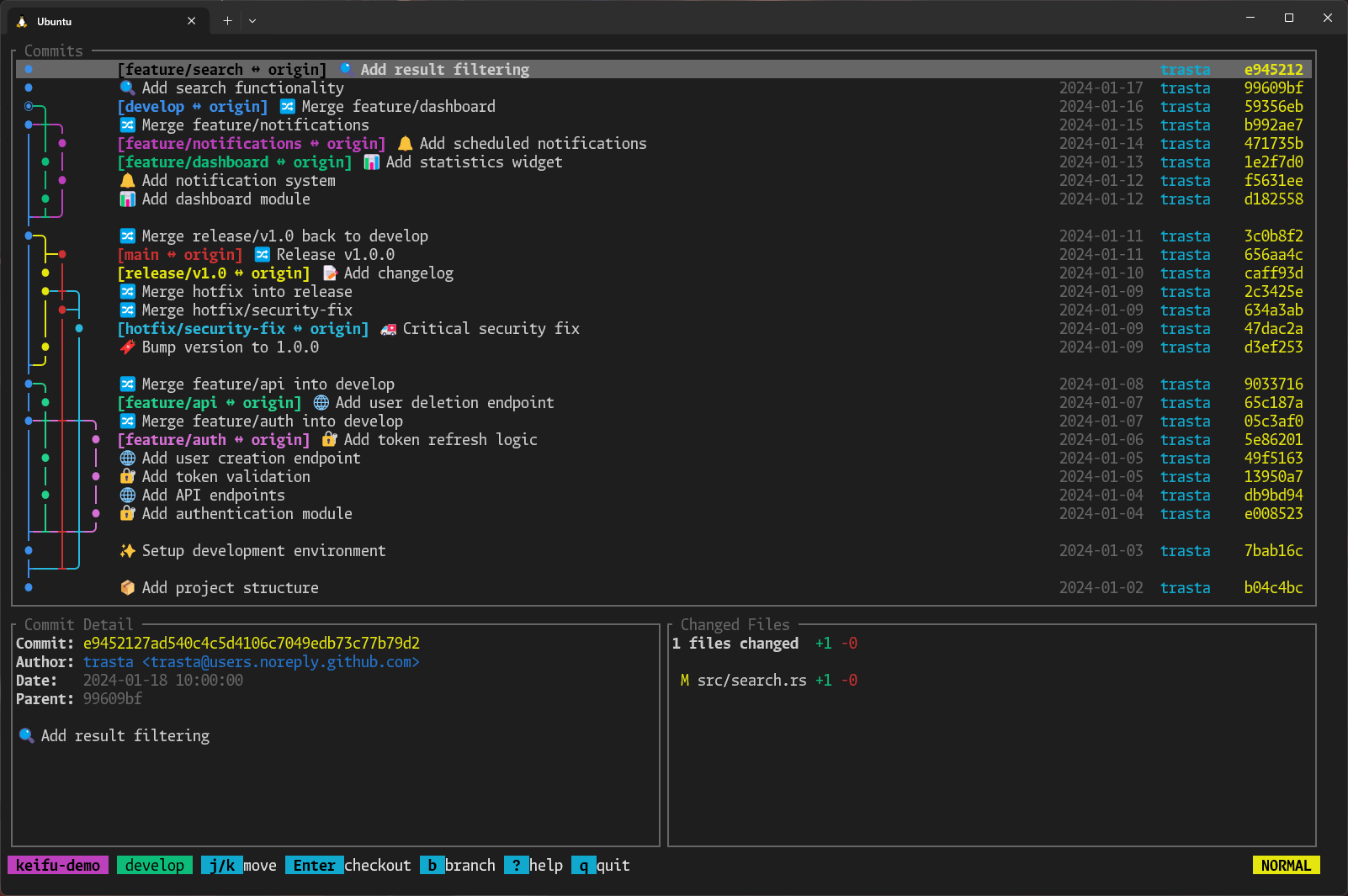
I built keifu, a TUI tool in Rust for visualising Git branch graphs from the CLI.
I regularly use the VS Code Git Graph extension and really like it. Recently, I've been trying to consolidate my tools into the CLI, and I wanted something similar. Since I couldn't find anything that felt right, I decided to build my own.
Repository#
trasta298/keifu
A TUI tool for visualizing Git branch graphs with interactive navigation
github.com
It's published on crates.io, so if you have a Rust environment, you can install it with cargo install keifu.
Motivation#
Evaluating Existing Tools#
I tried several tools for viewing Git graphs in the CLI.
About LazyGit
LazyGit is a very feature-rich tool, but it was overkill for my needs. I use Claude Code regularly, and I basically let Claude handle all git/gh commands except for branch switching. So being able to checkout is enough for me, and I didn't need a rich UI for Git operations.
Also, it seemed difficult to customize the graph display format. According to the official settings, you can adjust log output with branchLogCmd and allBranchesLogCmds, or toggle graph display with showGraph, but I couldn't find any settings to change the rendering style itself.
About git-graph / git-igitt
git-graph is a CLI tool (also available as a library), and git-igitt is an interactive TUI built on top of it. git-igitt is focused on viewing and doesn't implement Git operations like checkout. Also, I wasn't a fan of the arrow style in the UI. Unicode graph rendering is surprisingly something people have strong opinions about, and I thought it could be made more readable.
About serie
serie was the closest to my ideal. It takes an approach of drawing rich graphs using image protocols (iTerm/Kitty) in the terminal, and looks great.
However, I use Windows Terminal, which doesn't support these image protocols, so I couldn't use it. For those using compatible terminals, it's a good choice.
About gitui
gitui is also a feature-rich TUI, but graph display functionality has been requested in Issue #81 and hasn't been implemented yet.
Features I Wanted#
It's convenient to see at a glance which commit a branch forked from and what branches exist.
Also, when working on branches in parallel with Claude Code, it can become hard to keep track of what branches exist. I know which branch I'm working on, but I tend to lose sight of the big picture.
Technical Details#
Development#
The implementation was written by Claude Code. I initially tried Codex, but switched to Claude Code when the graph rendering didn't work out.
Tech Stack#
For reference, here are the libraries used:
- ratatui - TUI (Terminal UI) rendering
- crossterm - Terminal control
- git2 - Rust bindings for libgit2
- clap - Command-line argument parsing
The graph rendering logic is about 700 lines, handling lane management, fork point detection, and color assignment. Branches are color-coded, and colors are selected using a penalty-based algorithm to avoid adjacent lanes having the same color as much as possible.
Usage#
Just run keifu inside a Git repository.
keifuMain controls:
j/k: Move up/down]/[: Jump to commit with branch labelEnter: Checkoutb: Create branchd: Delete branch?: Show helpq: Quit
Target Audience#
I think this tool is suited for people who:
- Use Claude Code regularly and let Claude handle Git operations
- Work on branches in parallel and tend to lose track of what branches exist
- Want to see at a glance which commit a branch forked from using a graph
- Don't need as many features as LazyGit but want easy navigation between branches
Conclusion#
So far, I'm satisfied with how it feels to use. I don't plan to add many features going forward (since I basically let Claude Code handle things), but supporting git worktree might be nice to have.